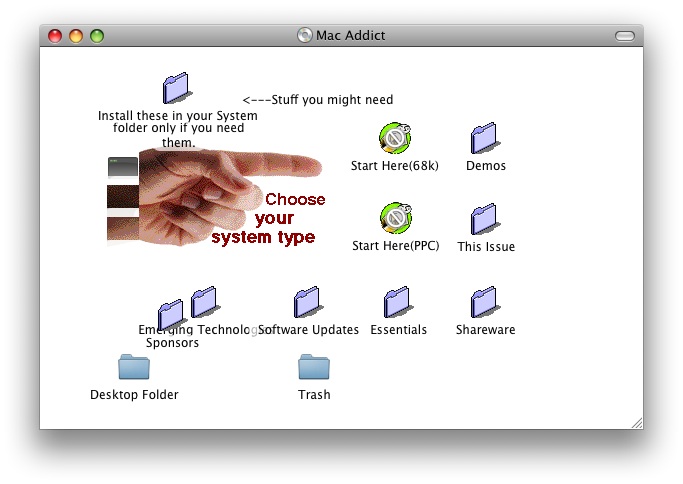
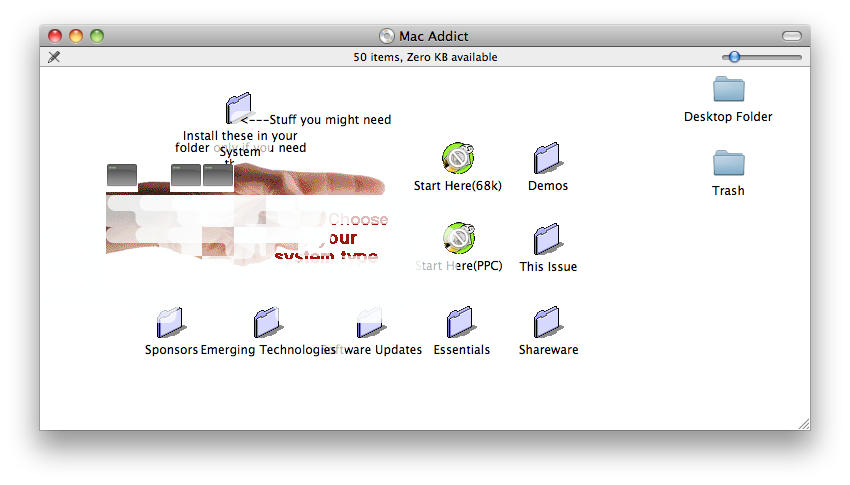
Over on Twitter, John Siracusa (@siracusa) posted up a screenshot from MacOS 10.5 of a folder layout from over a decade ago of an icon collection. Other than the font, it looked pretty much as it would’ve back in it’s pre MacOS X days. (yes, Apple made operating systems before MacOS X… and yes, some people used it. Myself included.)
Back in that time, there were plenty of CDs that would include pictures that were made up of multiple empty folders with custom icons. These folders would be named with whitespace so that there wouldn’t be any text obscuring the image. As long as the user didn’t try to click on the image, it would look like a single larger image. When MacOS X was introduced, Apple also introduced support for setting a background image for a folder rendering this practice obsolete.
That got me wondering – if MacOS 10.5 would render the folder layout correctly for the icon pack, would it render one of those pictures made up of multiple folders? How would MacOS 10.6 handle this, since it’s well known that Apple rewrote the Finder in Cocoa?
Well, luckily I happen to have a pile of Mac Addict CDs from way back in 1996. I tossed one into both a 10.5 machine and a 10.6 machine to see what would happen – the results are in the screenshot above. As you can see, 10.5 did a much better job of rendering the image than 10.6 – it looks like 10.6 will render a frame around the whitespace filename, which causes the image to be obscured. In 10.5, the Finder would only render the frame around the filename if it had visible text in it.
Another problem is that 10.5 and 10.6 both render some of the icons as the generic executable icon. It looks like 10.5 does a slightly better job than 10.6, but it still doesn’t render the upper left corner icon correctly.
But what I find amazing about all this is how well it actually does work. In the 13 years since this CD was published, Apple has moved away from resource forks, file types and creator codes, yet they have managed to make sure that for the most part, the icon layout is interpreted correctly. At the time this CD came out, there were even Macs still based on the 68k being used heavily (that was the processor used before the PowerPC, for those of you that don’t remember. What’s that? You don’t know about the PowerPC either??? *grumble, grumble* You kids these days… get off my lawn!). It wouldn’t surprise me to find out that the icon positioning code dates back to System 6 or even earlier, which means that Apple has been maintaining compatibility with this feature now for over 20 years, 3 hardware platforms and too numerous to count OS revisions.
Dec 17, 2009